Check a whole folder of documents for accessibility problems.
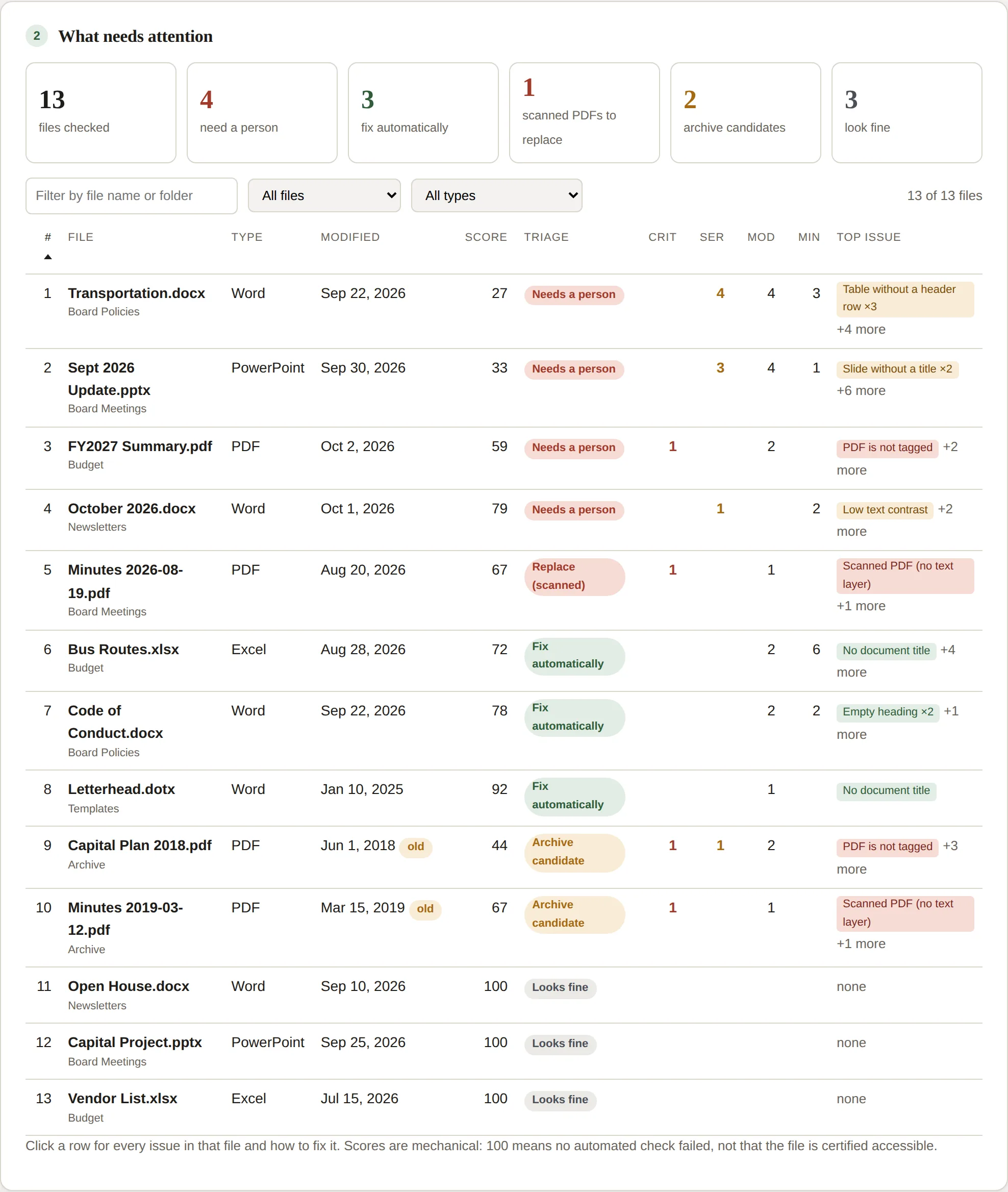
TagReady opens every Word, PowerPoint, Excel and PDF file in a folder and checks each one for the problems a screen reader runs into. You get one list, sorted worst first, that says which files need a person, which it can fix itself, which are scanned PDFs to replace, and which are old enough to archive.
For the Fix step, it writes corrected copies of the files it can fix into a new folder. Your originals are not changed.
Free for folders of up to 25 files. No account. The files are read in your browser tab and are not uploaded. Built for the ADA Title II web and document rule, whose compliance dates are April 24, 2026 for public entities serving 50,000 people or more and April 26, 2027 for smaller ones.
Other ways to do this
Word's Accessibility Checker is good, but it looks at one open document at a time. The tools that work in bulk are mostly sold to whole institutions and only see files inside the learning-management system, not the ones on a department drive or a town website.
| Option | Price | Scope | How it works |
|---|---|---|---|
| Microsoft Accessibility Checker | Free | One open document | Built into Office; no batch mode |
| Acrobat Pro (Action Wizard) | Subscription | PDFs only | Batch tag and check, desktop |
| Anthology Ally | ~$6.85 per student | Files inside the LMS | Institution-wide contract, five figures a year |
| Remediation vendors | Per page | PDFs | You send the files out |
| TagReady | From $12/mo | Any folder, all four formats | Runs in your browser |
Competitor pricing as publicly listed in consortium and vendor documents.
What it checks
The checks follow WCAG 2.1 AA and the checkers built into Office and Acrobat. Some problems are mechanical enough to fix automatically. The rest are listed with the menu path to fix them by hand.
Fixed automatically by the Fix step
- Missing document title
- Missing document language
- Tables without a header row
- Bold lines used as headings, in documents with no real headings
- Empty headings
Found and listed for a person to fix
- Images without alt text, or with placeholder alt text such as “Picture 1”
- Long documents without heading styles, and skipped heading levels
- Low text contrast
- Link text that is a bare URL or “click here”
- Text boxes and floating images outside the reading order
- Slides without titles or with duplicate titles, and embedded media
- Sheets with default names, empty sheets, data not formatted as a table, and charts without alt text
- PDFs that are untagged, scanned with no text layer, or missing a language, title or bookmarks; untagged forms; XFA forms
- Legacy .doc, .ppt and .xls files, which cannot hold accessibility information
- Files unchanged for three years or more that have serious problems (flagged as archive candidates)
What it does not do
- It does not write alt text. It shows which images have none or have placeholder text; the descriptions are yours to write.
- It does not tag PDFs. It finds the untagged and scanned ones and says whether to OCR them, re-export them from the source file, or retire them. The Fix step works on Office files only.
- It does not open legacy .doc, .ppt or .xls files. They are listed so you can convert them first.
- Its PDF checks are lighter than Acrobat's full check: tagging, text layer, language, title, bookmarks and headings. Use it to sort the pile, and Acrobat or PAC for the final check.
- Automatic fixes are conservative. Bold lines become headings only in documents that have no real headings, so an author's own outline is never overwritten, and every change is logged.
How it works
- Choose a folder. Subfolders are included. TagReady reads every .docx, .pptx, .xlsx and .pdf file inside the browser tab, at roughly a hundred Office files a minute, and skips everything else.
- Read the results. Each file gets a score, its worst issue and a triage label. Sort or filter the list, and click a file to see every issue in it.
- Share the report. Download a single HTML report for your accessibility office, plus CSV files for Excel.
- Fix in bulk (paid plans). Write corrected copies of every fixable file into a new folder, with a log of each change and a list of what still needs a person.
What it finds in the wild
In October 2026 we ran TagReady over the first 30 public PDFs a search engine returns for each of the 64 SUNY campuses: 1,670 documents, 61,291 pages. 63% had at least one accessibility defect, 41% had no title, and 19% were untagged. The pass rate ranged from 100% at one campus to 4% at another. Read the report and see every campus.
Where your files go
- TagReady is a web page that does all its work in your browser. Files are opened, checked and fixed on your own computer, and none of them are sent anywhere.
- The app makes one kind of network request: a license check with Gumroad when you enter a key. No file content is part of it.
- There is no account, no login and no analytics inside the app.
- Your IT office can confirm all of this by opening the browser's developer tools and watching the Network tab during a scan.
Because nothing leaves the computer, student work, personnel files and draft minutes can be checked without a vendor data agreement.
Pricing
Start with an Individual membership if the files are yours to fix. Every paid plan includes unlimited scans and the Fix step. Department and campus licenses are annual and have no per-scan limit. Inventory-only versions, without the Fix step, are available for offices that only need the report.
| Plan | Price | Who it is for | Includes | |
|---|---|---|---|---|
| Free | $0 | Anyone who wants to see what is in a folder | Folders of up to 25 files; full results, report and CSVs; no account or sign-up | Scan a folder |
| Individual | $12 a month or $99 a year |
The instructor, TA, instructional designer or communications person who has been asked to fix their own files | Folders of up to 500 files per scan; Fix step (corrected copies in bulk, originals unchanged); one person, on up to 3 of their own computers; cancel from your Gumroad receipt and keep every fixed copy | Buy Individual |
| Department / school | $699 a year inventory only $299 |
Everyone in one department, school or town office | No per-scan limit; shared drives are fine; Fix step included; report carries your office's name | Buy Department |
| District / campus | $1,999 a year inventory only $899 |
A whole district, college or agency | No per-scan limit; Fix step included; invoice and purchase order available | Buy District |
Individual memberships bill monthly or yearly through Gumroad (you choose at checkout) and can be cancelled any time. Department and campus licenses renew yearly. All plans include updates and a 14-day refund if it does not work on your files. Public entities that need a quote or a W-9 can email support@oddwell.tech.